You press a button on your remote and a live football game appears on your TV a second or two later. With cable, that signal came down a coaxial line. With satellite, it came from a dish on the roof. With IPTV, it came over the same internet connection you use for email and video calls. But what actually happens between the stadium camera and your screen? Contact Whatsapp
This guide explains how Internet Protocol Television works, step by step and in plain language: how channels are prepared, how streams travel across the internet, why the picture sometimes changes quality, what devices and apps do, and what you need at home for smooth viewing in the USA. If you are completely new to internet TV, you may also want to read our beginner’s guide to IPTV in the USA.
What Is IPTV?
IPTV stands for Internet Protocol Television. “Internet Protocol” (IP) is the set of rules that every device on the internet uses to send and receive data in small pieces called packets. IPTV simply uses those same rules to deliver television. IPTV Prices
Instead of broadcasting every channel at once down a cable or from a satellite, IPTV sends you only the stream you are watching, when you ask for it. That one difference explains most of what makes internet TV feel different from traditional TV: on-demand libraries, pause and rewind on live channels, watching on your phone, and picture quality that depends on your connection.
IPTV is a delivery technology, not a company or a type of content. Well-known US services such as YouTube TV, Hulu + Live TV, Sling TV, Fubo, Philo and DIRECTV’s streaming packages all deliver live channels over IP.
How IPTV Works: The Journey From Studio to Screen
Every IPTV stream goes through roughly the same five stages.
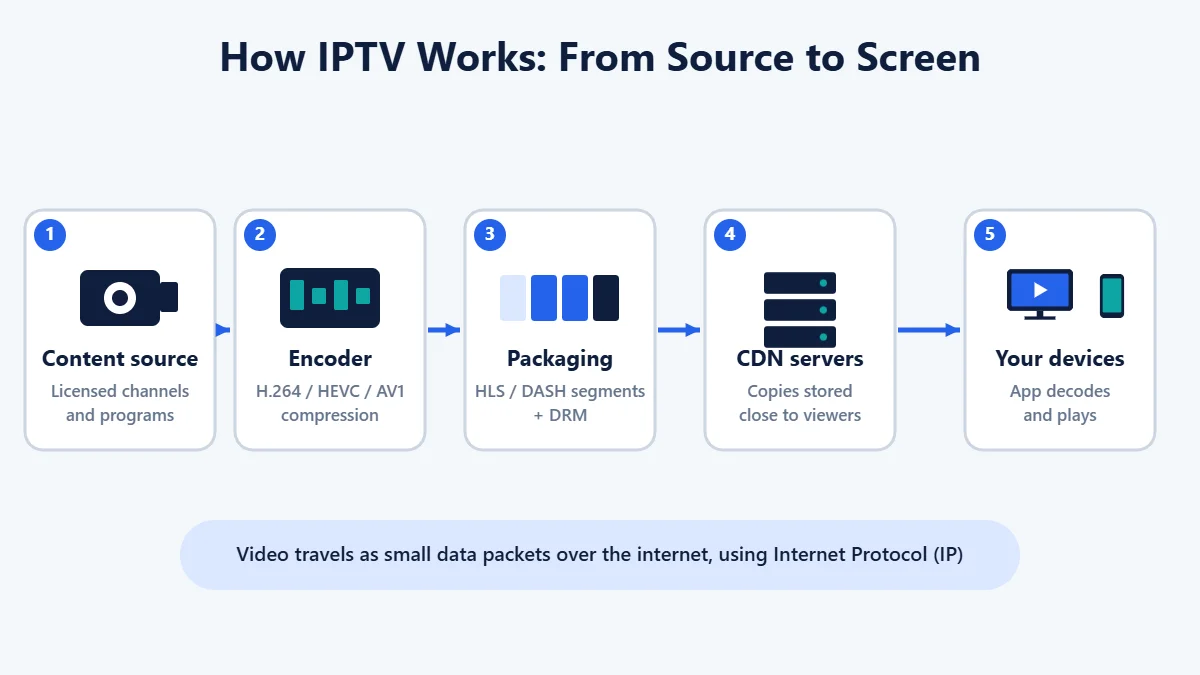
1. Acquisition: Getting the Content
The provider first receives the channels and programs it has the rights to distribute. Live channels typically arrive from the networks through satellite downlinks or dedicated fiber connections, while movies and series arrive as high-quality master files. Local stations may be picked up in each market so viewers see their own local news and ads.
2. Encoding and Compression
Raw broadcast video is far too large to send over a home internet connection, so it is compressed by an encoder. Encoders use video codecs, which are methods of shrinking video while keeping it looking as close to the original as possible:
- H.264 (AVC): the most widely supported codec, playable on almost every device.
- H.265 (HEVC): roughly half the data of H.264 at similar quality, commonly used for 4K.
- AV1: a newer, royalty-free codec that is even more efficient, increasingly supported on recent TVs, streaming players and phones.
Audio is compressed too, typically as AAC for stereo or Dolby Digital formats for surround sound.
3. Packaging Into Small Segments
Most internet TV today is delivered using HTTP-based adaptive streaming. The encoded video is cut into short segments, usually a few seconds long, and each segment is stored at several quality levels, for example 480p, 720p, 1080p and 4K. A small index file called a manifest (or playlist) tells your app where every segment is and which qualities are available.
The two main formats are:
- HLS (HTTP Live Streaming): created by Apple and supported on virtually every device.
- MPEG-DASH: an open international standard used widely on smart TVs, Android devices and web browsers.
At this stage, legitimate services also apply DRM (digital rights management), such as Widevine, PlayReady or FairPlay, which encrypts the video so only authorized apps and devices can play it. This is part of what allows providers to license premium channels and sports.
4. Delivery Over the Network
The segments are sent from the provider’s origin servers to a content delivery network (CDN): a large network of servers spread across the country that store copies of the video close to viewers. When you start a channel in Dallas, your app fetches segments from a nearby server rather than from a data center on the other side of the country. This reduces delay, spreads out the load during big events and helps keep streams stable.
From the CDN, the data travels through your internet provider’s network, into your modem and router, and then over Ethernet or Wi-Fi to your device.
5. Playback on Your Device
The app on your smart TV, streaming stick, phone or computer does several jobs at once:
- Downloads the manifest and the next few segments ahead of time into a small buffer.
- Checks your license so DRM-protected video can be decrypted.
- Decodes the video, ideally using the device’s built-in hardware decoder.
- Displays the picture, sound, captions and channel guide.
Adaptive Bitrate: Why the Picture Quality Changes
Have you ever noticed a stream start slightly blurry and sharpen after a few seconds? That is adaptive bitrate streaming (ABR) at work.
Because each segment is available at several quality levels, your app constantly measures how fast segments are arriving. If your connection is strong, it requests higher-quality segments. If someone else in the house starts a big download or your Wi-Fi weakens, it switches to a lower quality for the next segments instead of stopping completely. The result is usually a softer picture rather than a frozen screen.
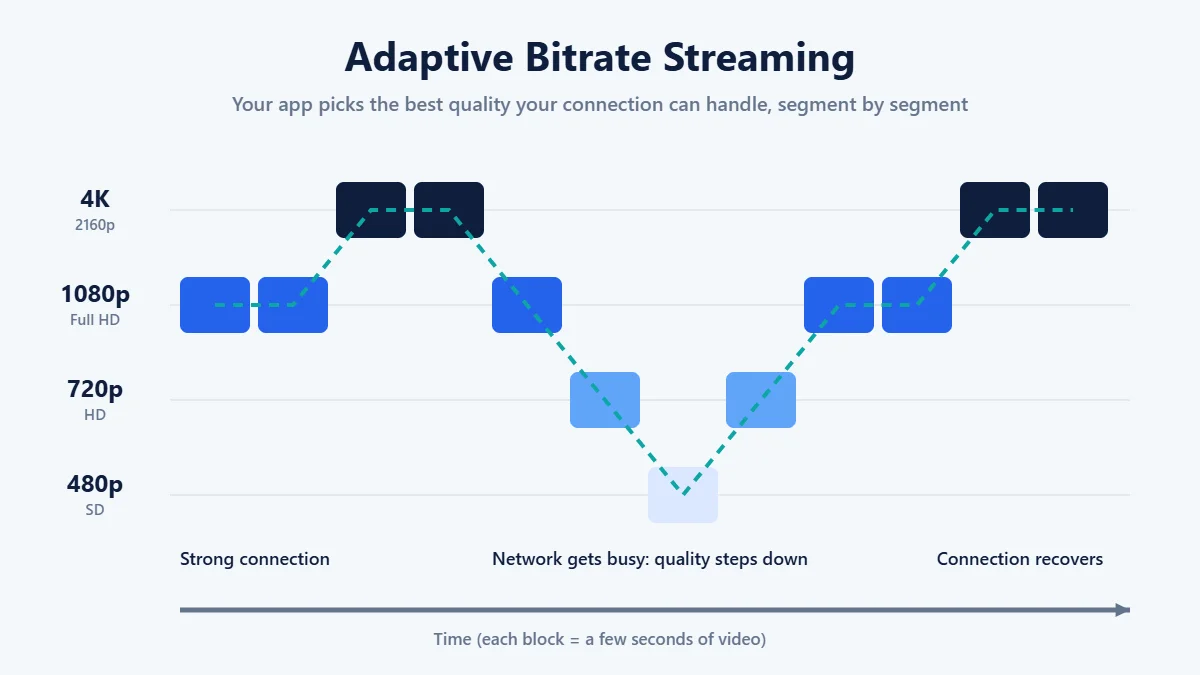
Buffering happens when data arrives more slowly than even the lowest available quality needs, so the buffer runs empty and playback pauses until more segments arrive.
Managed IPTV vs. Internet Streaming (OTT)
The term IPTV is used in two slightly different ways, and knowing the difference helps when reading about internet TV.
| Feature | Managed IPTV | Internet streaming (OTT) |
|---|---|---|
| Who runs the network | Your internet or phone company, end to end | The streaming service, over the public internet |
| Typical delivery | Private network, often multicast | Unicast HTTP streaming via CDNs (HLS, DASH) |
| Equipment | Provider’s set-top box | Devices you already own with an app |
| Where you can watch | Usually only at home | At home and, for many channels, on the go |
| US examples | TV packages from some telecom and fiber providers | YouTube TV, Hulu + Live TV, Sling TV, Fubo, Philo |
Multicast means one stream is sent once across the provider’s network and copied only where viewers need it, which is efficient for live TV in a closed network. Unicast means each viewer gets their own stream, which is how almost all streaming over the open internet works. In the USA, most people who say “IPTV” today mean the second kind: live TV delivered by an app over their regular home internet.
The Main Types of IPTV Content
- Live TV: channels streamed in real time, just like cable, including news, sports and local stations.
- Video on demand (VOD): movies and episodes you can start whenever you like.
- Time-shifted TV: features such as start-over, pause and rewind on live channels, and catch-up viewing of recent shows.
- Cloud DVR: recordings stored on the provider’s servers rather than a box in your home, so you can often watch them on any supported device.
- FAST channels: free, ad-supported live-style channels from services such as Pluto TV, Tubi, The Roku Channel and Samsung TV Plus.
What Makes a Live IPTV Stream Fall Behind?
Live internet TV often runs anywhere from a few seconds to around half a minute behind cable or an over-the-air antenna. This delay, called latency, comes from encoding, cutting video into segments, CDN delivery and the buffer your app keeps to avoid interruptions. Newer low-latency versions of HLS and DASH shorten this gap, which matters most for live sports when friends or social media might spoil a score before you see it.
The Building Blocks of an IPTV Service
Behind every app is more than just video. A complete IPTV service usually includes:
- Headend: the facility or cloud system where channels are received, encoded and packaged.
- Middleware: the software that manages accounts, subscriptions, channel lineups and the user interface.
- EPG (electronic program guide): the on-screen guide that shows what is on now and next.
- Location services: checks based on your ZIP code or location, so you receive the correct local stations and regional sports.
- DRM and licensing servers: systems that confirm your device is allowed to play protected content.
- Apps: official players for smart TVs, streaming devices, phones, tablets and web browsers.
What You Need at Home
An Internet Connection
Speed recommendations are per stream, so add them up for every screen that may be in use at once. YouTube TV, for example, recommends:
- 3 Mbps or more for standard definition
- 7 Mbps or more for a single HD stream
- 13 Mbps or more for reliable HD while other devices share the network
- 25 Mbps or more for 4K on supported programs
Stability matters as much as raw speed. A connection that regularly drops or slows in the evening will cause more problems than one that is slightly slower but consistent.
A Compatible Device
Most services work on devices many households already own: smart TVs (Google TV, Android TV, Samsung Tizen, LG webOS, Roku TV), streaming players like Amazon Fire TV, Roku, Apple TV and Google TV Streamer, plus phones, tablets and computers. Always install apps from official app stores and check the provider’s official device list before subscribing.
A Good Home Network
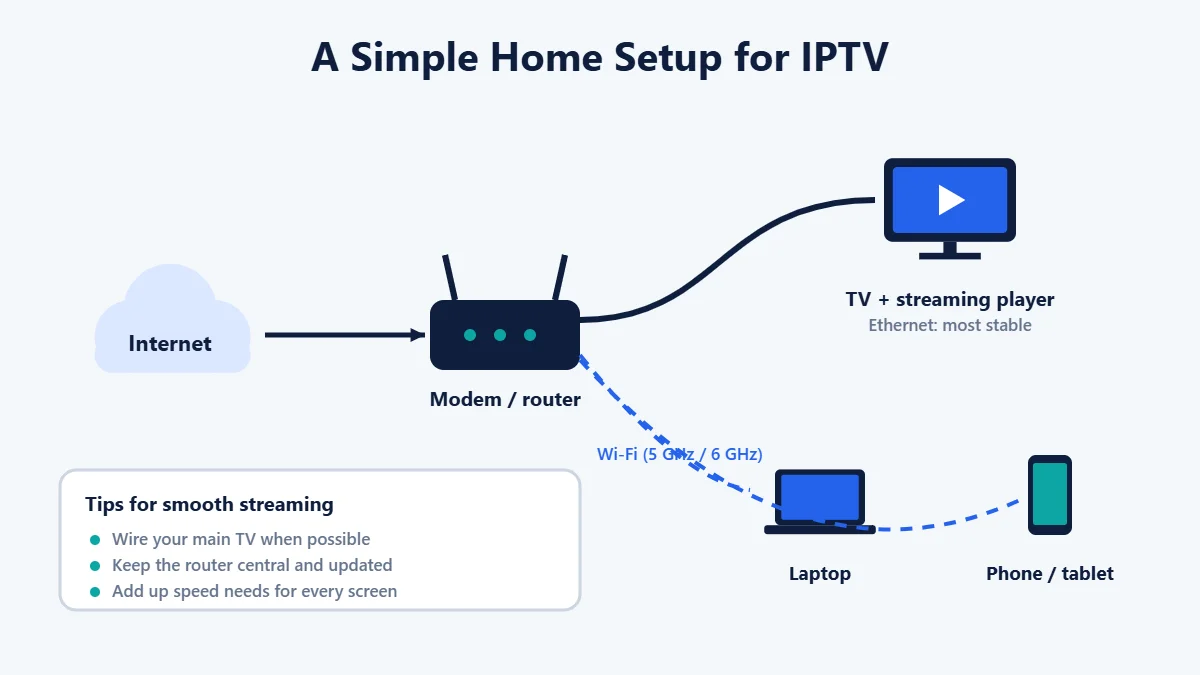
- Use Ethernet for your main TV or streaming device when you can.
- Place your router centrally, or use a mesh Wi-Fi system in larger homes.
- Prefer 5 GHz or 6 GHz Wi-Fi bands for streaming devices close to the router.
- Keep your router, device software and apps updated.
Advantages and Limitations of IPTV
| Advantages | Limitations |
|---|---|
| Watch on TVs, phones, tablets and computers | Depends on the quality and stability of your internet connection |
| Usually month-to-month with no long contract | Live streams can lag behind cable or antenna |
| Cloud DVR, start-over and on-demand libraries | Heavy streaming can count against data caps on some internet plans |
| No dish or cable installation needed | Channel and local station availability varies by ZIP code |
| Picture adapts automatically to your connection | 4K is not available on every channel and may cost extra |
Common IPTV Problems Explained
- Buffering: data is arriving too slowly. Check your speed, move closer to the router or switch to Ethernet, and pause large downloads.
- Blurry picture: adaptive bitrate has dropped to a lower quality because of network congestion. It usually recovers once the connection improves.
- Audio out of sync: restarting the app or device usually fixes it. Also check your TV or soundbar audio delay settings.
- “Content not available in your area”: location checks restrict some local and sports channels. Make sure location services are allowed for the app.
- App crashes or will not load: update the app and device software, restart the device and router, then check the provider’s status page.
For a broader comparison of services, devices and features, see our guide on how to compare IPTV streaming services in the USA.
Is IPTV Safe and Legal?
The technology itself is completely legal and used by many of the biggest names in American TV. What matters is the provider. A service must have the rights to distribute the channels and programs it streams. Services without those rights can be shut down without notice, and the Federal Trade Commission has warned that illegal streaming apps and add-ons can carry malware that puts your devices and personal information at risk.
Before paying any provider, check that:
- The company is clearly identifiable, with contact details, terms of service, a privacy policy and a refund policy.
- Its apps are available in official app stores, and you are never asked to disable your device’s security settings.
- The price is realistic for the channels offered.
- You can pay with a method that offers buyer protection, such as a credit card.
- Independent reviews and information about the company exist.
Frequently Asked Questions
How does IPTV work in simple terms?
The provider compresses TV channels into digital video, cuts it into short segments and sends it over the internet through servers close to you. An app on your device downloads those segments, decodes them and plays them on screen, adjusting quality to your connection speed.
What is the difference between IPTV and regular streaming?
Both use internet technology. IPTV usually refers to live TV channels delivered over IP, either on a provider’s private network or through an app. “Streaming” is often used for on-demand apps like Netflix, but many services now combine live channels and on-demand content.
Do I need a special box for IPTV?
Usually not. Most US live TV streaming services offer apps for smart TVs, streaming sticks, phones, tablets and web browsers. Some telecom TV packages still use their own set-top box.
How much internet speed does IPTV use?
As a guide, YouTube TV recommends at least 7 Mbps for one HD stream and 25 Mbps for 4K. Multiply by the number of screens that may be in use at the same time.
Why is live IPTV behind cable?
Encoding, segmenting, delivery and the playback buffer each add a little delay. Many services are working to reduce this with low-latency streaming formats.
Does IPTV work without internet?
No. IPTV needs an active internet or IP network connection. Some apps let you download certain on-demand titles to watch offline, but live channels always require a connection.
Is IPTV legal in the USA?
Yes, IPTV as a technology is legal. Legality depends on whether the provider has the rights to the content it distributes.
Conclusion
IPTV works by turning television into data: channels are encoded, split into small segments, delivered through content delivery networks and reassembled by an app on your device, with quality adjusting in real time to your connection. Understanding these steps makes it easier to choose the right service, set up your home network properly and fix problems when they happen. Start with a stable internet connection, use official apps on supported devices, and choose a provider you can trust to have the rights to its content.