If you have heard the term “IPTV” and wondered whether it could replace your cable bill, you are not alone. More and more American households now watch live TV over the internet instead of through a cable box or satellite dish. But the word IPTV covers a lot of ground, from big household names to small providers you have never heard of, and the differences matter.
This beginner’s guide explains IPTV in the USA in plain language: what it is, how internet TV works, how it compares with cable and satellite, which devices you can use, what it typically costs, how to set it up, and how to tell a legitimate service from one you should avoid.
What Is IPTV?
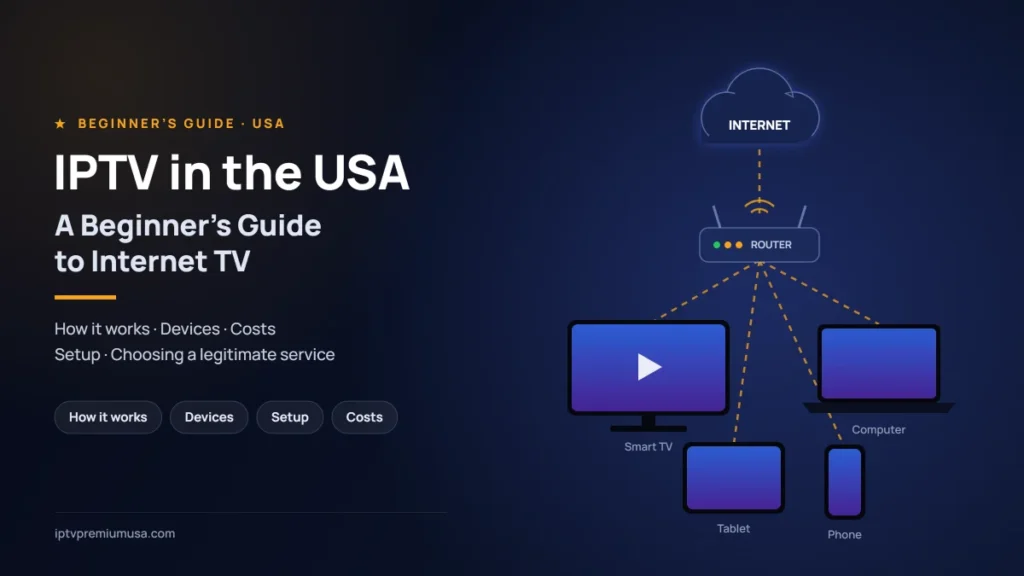
IPTV stands for Internet Protocol Television. It is a way of delivering television over an internet connection, using the same basic technology that carries websites, video calls and music streams to your home.
The key point for beginners is this: IPTV is a delivery technology, not a type of content and not a single company. Many well-known, fully legitimate services deliver live TV this way, including YouTube TV, Hulu + Live TV, Sling TV, DIRECTV’s streaming packages and Philo. Whether a particular IPTV service is legal depends entirely on whether the provider has the rights to distribute the channels and programs it offers, which we cover in detail later in this guide.
How IPTV Works
You do not need to understand networking to use IPTV, but a simple picture helps when you are troubleshooting or comparing services.
- The provider receives and prepares the content. Channels and programs are encoded into digital video streams at different quality levels, such as standard definition, HD and, on some services, 4K.
- The streams travel over the internet. They are sent from the provider’s servers, often through a content delivery network that keeps copies closer to viewers, to your internet connection.
- An app on your device plays them. A smart TV app, streaming stick, phone or computer receives the stream, adjusts quality to your connection speed and displays it on screen.
Because the quality adapts to your connection, a slower or busier network usually means a softer picture or occasional buffering rather than no picture at all.
IPTV vs. Cable vs. Satellite vs. Streaming Apps
Here is how internet TV compares with the other main ways Americans watch television.
| Option | How it reaches you | Equipment | Contracts | Best for |
|---|---|---|---|---|
| Cable TV | Coaxial or fiber line from a local cable company | Cable box, often rented | Often promotional or term pricing | Households that want a traditional bundle with internet and phone |
| Satellite TV | Signal from a satellite to a dish | Dish and receiver | Often term agreements | Rural areas where wired options are limited |
| Live TV streaming (IPTV) | Your home internet connection | Devices you may already own | Usually month to month | Cord-cutters who still want live channels |
| On-demand streaming apps | Your home internet connection | Devices you may already own | Usually month to month | Watching series and movies on your own schedule |
| Free over-the-air antenna | Broadcast signals from local TV towers | TV antenna | None | Local channels with no monthly fee, where reception is good |
Many households mix these options, for example a live TV streaming service for news and sports, one or two on-demand apps for series, and an antenna for local channels.
The Main Types of Internet TV
When people talk about IPTV or internet TV in the USA, they usually mean one of these categories:
Live TV Streaming Services
These services offer cable-style lineups of live channels, often including local stations, news and sports, delivered over the internet. Examples include YouTube TV, Hulu + Live TV, DIRECTV’s streaming packages, Sling TV, Fubo, Philo and Frndly TV. They typically charge a monthly fee and include features such as a cloud DVR.
Free Ad-Supported Streaming TV (FAST)
FAST services offer free live-style channels and on-demand titles funded by advertising, much like traditional broadcast TV. Well-known examples include Pluto TV, Tubi, The Roku Channel and Samsung TV Plus. Pluto TV, for example, describes itself as completely free with no credit card required. Lineups focus on themed channels, classic shows and movies rather than the full set of cable networks.
On-Demand Subscription Apps
Services like Netflix, Disney+ and HBO Max are mainly on-demand libraries rather than live channel lineups, although some now include a limited amount of live content. They are often used alongside a live TV service.
Independent IPTV Providers
Smaller providers sell access to channel lineups, often through a separate player app and login details sent after payment. Some operate with the necessary rights to their content; others do not. Because this category varies so much, it is where careful checking matters most.
Devices You Can Use to Watch IPTV
One of the biggest advantages of internet TV is that you can often use devices you already own. Support varies by service, so always check a provider’s official device list before you pay.
Amazon Fire TV and Fire TV Stick
Fire TV devices plug into your TV’s HDMI port and run apps from the Amazon Appstore. Many major live TV services offer official Fire TV apps. Install apps from the official store rather than from unknown download links.
Smart TVs
Most current smart TVs, including models running Google TV or Android TV, Samsung’s Tizen, LG’s webOS and Roku TV, have built-in app stores. App availability differs between brands and model years, so check that the service you want supports your specific TV.
Roku, Apple TV and Google TV Streamers
Dedicated streaming players are a simple way to add apps to any TV with an HDMI port. They are also a good option if your smart TV is older and no longer receives app updates.
Android Phones and Tablets
Live TV apps from major providers are available on Google Play. Phones and tablets are handy for watching around the house, and some services restrict viewing outside your home area for certain channels.
iPhone and iPad
Major live TV apps are available on the Apple App Store, and some support AirPlay so you can send video to a compatible TV or Apple TV.
Computers
Most major services can be watched in a web browser on a Windows PC, Mac or Chromebook, which is useful if you do not have a streaming device connected to your TV.
Quick IPTV Setup Guide
Getting started with a mainstream live TV streaming service usually takes only a few minutes:
- Check your connection. Run a speed test near the TV you plan to use.
- Choose your device. Use your smart TV’s built-in apps or connect a streaming player to an HDMI port.
- Install the official app from your device’s app store.
- Create an account or sign in on the provider’s official website or app, and review the plan, price and renewal terms before confirming.
- Enter your ZIP code if asked, so local channels and regional sports are set correctly.
- Test your must-have channels and adjust settings such as picture quality, captions and profiles.
Internet Connection: What You Really Need
Your internet connection is the foundation of a good IPTV experience. Providers publish their own recommendations. YouTube TV, for example, recommends:
- 3 Mbps or more for standard definition video
- 7 Mbps or more for a single HD stream
- 13 Mbps or more to stream HD reliably while other devices use the same network
- 25 Mbps or more for 4K on supported programs
Netflix lists 3 Mbps or higher for HD and 15 Mbps or higher for 4K. These are guidelines for each stream, so add them up for every screen that may be in use at the same time, plus anything else your household does online, such as video calls or gaming.
Tips to Reduce Buffering
- Use a wired connection for your main TV or streaming device when possible. Ethernet is usually more stable than Wi-Fi.
- Improve your Wi-Fi by moving the router closer to the TV, reducing obstructions or using a mesh system in larger homes.
- Restart your device and router if streams suddenly stutter.
- Keep apps and device software updated to get the latest fixes.
- Check your speed at the time of day you usually watch, since evening congestion is common.
- Pause large downloads on other devices during live events.
Basic Troubleshooting Steps
- Check whether other apps work. If nothing loads, the problem is likely your internet connection.
- Close and reopen the app, then restart the streaming device.
- Restart your modem and router.
- Check the provider’s status page or support channels for known outages.
- Contact the provider’s support with your device model and a description of the problem.
How Much Does IPTV Cost in the USA?
Costs vary widely depending on the type of service and the channels you want. Here are the main pricing models:
- Free (FAST): no subscription fee, supported by ads.
- Lighter live TV packages: lower monthly prices, usually focused on entertainment and lifestyle channels, often without local stations or major sports.
- Full live TV packages: cable-style lineups with local channels, news and sports, at higher monthly prices.
- Add-ons: sports packs, premium movie channels, extra screens or 4K can increase the total.
For reference, here are the list prices of some well-known US services as shown on their official websites in October 2026. Prices change often, may vary by location and usually exclude taxes and fees.
| Service | Type | List price / month |
|---|---|---|
| Pluto TV | Free, ad-supported | Free |
| Frndly TV | Lighter live TV package | $8.99 to $12.99 depending on plan |
| Philo (Essential) | Lighter live TV package | $25 |
| Sling TV (Orange or Blue) | Live TV package | $45.99 |
| YouTube TV | Full live TV package | $82.99 |
| DIRECTV (Entertainment) | Full live TV package | $89.99 |
| Hulu + Live TV (With Ads) | Full live TV package | $99.99 |
When comparing costs, look at the total you will actually pay each month, including add-ons, taxes and fees, and remember that introductory prices often rise after the first month or two. For a deeper side-by-side look at these factors, see our guide on how to compare IPTV streaming services in the USA.
How to Evaluate an IPTV Service
Before you commit to any service, check these essentials:
Picture Quality
Find out which channels are offered in HD or 4K and whether 4K costs extra. Then judge quality yourself by watching on the TV you will actually use, ideally during a busy live event.
Channel Selection
List the channels you cannot do without, such as your local stations, favorite news networks and the sports you follow, and confirm each one is included for your location. Major services let you check their lineups by ZIP code on their websites.
Customer Support
Check how you can reach support, when it is available and how quickly it responds. Sending a question before you sign up is a simple, useful test.
Device Compatibility
Confirm that every device in your home is supported through an official app, and check how many screens can stream at the same time.
Cancellation Terms
Read how billing and renewals work and how to cancel. Reputable services make cancellation clear, and many allow you to cancel online at any time.
How to Check That an IPTV Provider Has the Rights to Its Content
This is the most important step for any beginner. In the US, distributing copyrighted channels and programs without permission from the rights holders is illegal. Services that do so can be shut down without warning, leaving customers without the service they paid for. The Federal Trade Commission has also warned that illegal streaming apps and add-ons can carry malware that may spread to other devices on your home network and expose personal information.
Use these checks before you pay any provider:
- Is the company identifiable? Look for a clear business name, contact details, terms of service, a privacy policy and a refund policy.
- Is the app in official app stores? Apps from the Apple App Store, Google Play, the Amazon Appstore or the Roku Channel Store have gone through the store’s review process. Be very cautious if you are told to download an app from an unknown link or to disable security settings.
- Does the price make sense? Thousands of premium channels and every major sports package for a few dollars a month is a strong warning sign.
- Is the provider clear about what it offers and on what basis? Legitimate services are open about their channel lineups, plans and terms.
- How do you pay? Payment methods with buyer protection, such as credit cards, give you more recourse than gift cards, cryptocurrency or direct bank transfers.
- Can you find independent information? Search for the provider’s name together with words like “reviews” or “complaints” and look for coverage from reputable sources.
If you cannot confirm that a provider has the rights to the content it offers, the safest choice is not to subscribe.
Common Beginner Mistakes
- Choosing by channel count alone. A huge number means little if your must-have channels are missing.
- Paying for a long plan up front. Test a service first with a free trial, where one is offered, or the shortest available plan.
- Ignoring the internet connection. Many buffering problems come from Wi-Fi or network congestion rather than the service itself.
- Installing apps from unknown sources. This can expose your devices and personal data to malware.
- Overlooking local channels. Not every service includes local stations; an antenna can fill the gap.
- Forgetting add-on costs and price changes. Check the total monthly cost after any promotional period ends.
- Skipping the rights check. A cheap service that disappears overnight is no bargain.
Frequently Asked Questions
Is IPTV legal in the USA?
Yes, IPTV as a technology is legal, and many major services use it. Legality depends on the provider: a service must have the rights to distribute the channels and programs it streams. Watching through a provider without those rights can expose you to legal and security risks.
Do I need a special box to watch IPTV?
Usually not. Most services work on smart TVs, streaming sticks, phones, tablets and computers you may already own. Check the provider’s official device list.
Can I watch local channels with IPTV?
Some live TV services include local ABC, CBS, FOX and NBC stations in many areas, while lighter packages often do not. Check availability for your ZIP code, or consider a TV antenna for free over-the-air local channels.
Is free internet TV really free?
Free ad-supported services such as Pluto TV, Tubi and The Roku Channel do not charge a subscription fee; they show ads instead. Be cautious with apps that offer paid channels or premium sports for free, which the FTC links to pirated content and malware risks.
Will IPTV work with my internet connection?
Many connections handle HD streaming comfortably. As a guide, YouTube TV recommends at least 7 Mbps for a single HD stream and 25 Mbps for 4K, so add up what your household will use at the same time.
Can I cancel anytime?
Many major live TV services are month to month and can be cancelled online, but terms vary. Always read the billing and cancellation terms before signing up.
Checklist: Choosing the Right IPTV Service
- Write down your must-have channels, including local stations and sports.
- Check your internet speed at the times you usually watch.
- List every device you want to use and confirm each one is supported by an official app.
- Compare the total monthly cost, including add-ons, taxes, fees and post-promotion prices.
- Check how many screens can stream at once.
- Review DVR, catch-up and on-demand features.
- Read the billing, renewal and cancellation terms.
- Test customer support with a question before you sign up.
- Confirm the provider is identifiable and has the rights to the content it offers.
- Start with a free trial or the shortest plan, then decide.
Conclusion
IPTV in the USA is simply television delivered over the internet, and it can be a flexible, affordable alternative to cable or satellite. The best experience comes from a stable internet connection, devices with official apps, a channel lineup that matches what you actually watch, and a provider you can trust to have the rights to its content. Use the checklist above, test before you commit, and you will be well on your way to choosing internet TV with confidence.